
Transactions
Monitor and review transaction activity in the Platform UI.
Transaction Monitoring
The Transactions section in the Platform UI provides comprehensive tools for monitoring, reviewing, and analyzing transaction activity. This is where compliance teams track financial movements, identify suspicious patterns, and ensure regulatory compliance.
Overview
The Transactions dashboard displays:
- All transactions in the system
- Real-time transaction alerts
- Risk scores and flags
- Investigation status
- Compliance actions taken
Transaction List View
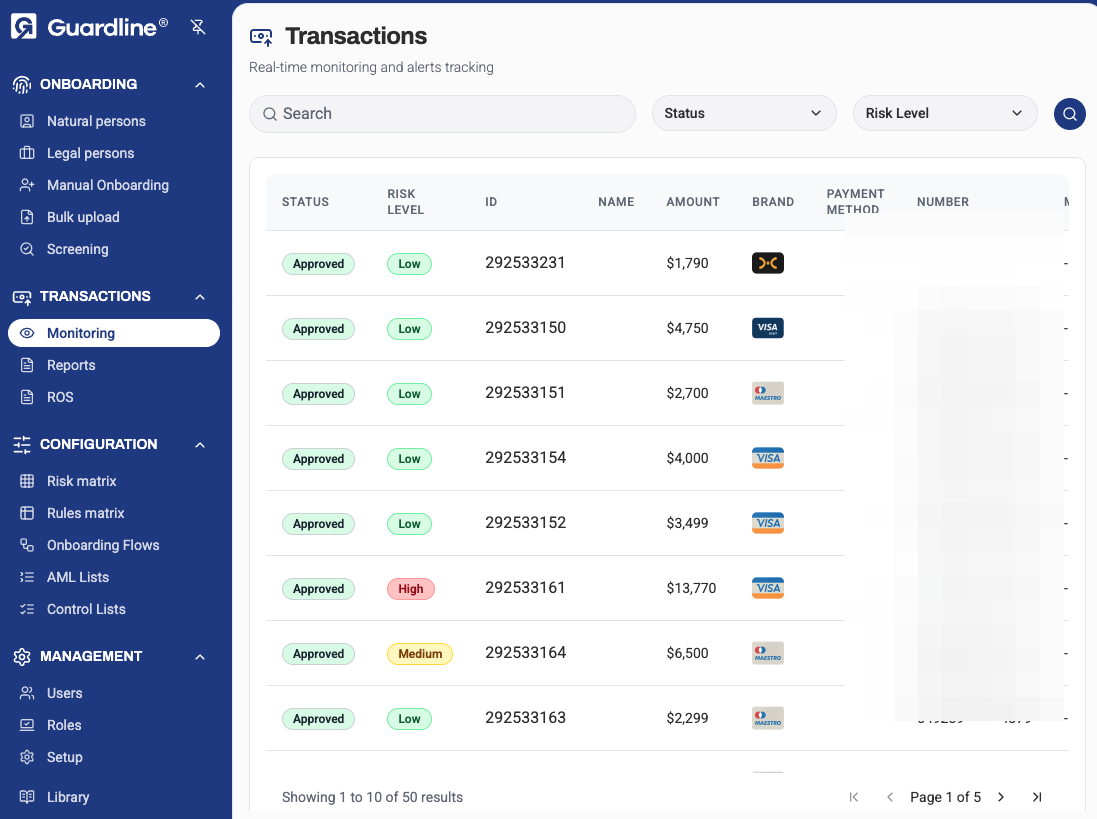
The main transactions view displays all financial activity with filtering, search, and monitoring capabilities.
Filtering and Search
Find specific transactions using:
- Transaction ID — unique identifier
- Amount range — min/max transaction value
- Currency — filter by currency type
- Date range — transaction date or creation date
- Status — completed, pending, flagged, blocked
- Risk level — low, medium, high, critical
- Customer — sender or receiver name/ID
- Type — payment, transfer, withdrawal, deposit
- Country — originating or destination country
- Alert status — has alerts, no alerts
List Columns
Customize displayed columns:
| Column | Description |
|---|---|
| Transaction ID | Unique identifier |
| Date/Time | When transaction occurred |
| Customer | Associated applicant or entity |
| Type | Transaction category |
| Amount | Transaction value and currency |
| Risk Score | Automated risk assessment |
| Status | Current state |
| Alerts | Number of triggered alerts |
| Assigned To | Reviewer if flagged |
| Actions | Quick action buttons |
Sorting and Grouping
Organize transactions by:
- Date (newest/oldest first)
- Amount (highest/lowest first)
- Risk score (highest risk first)
- Status
- Customer
Transaction Detail View
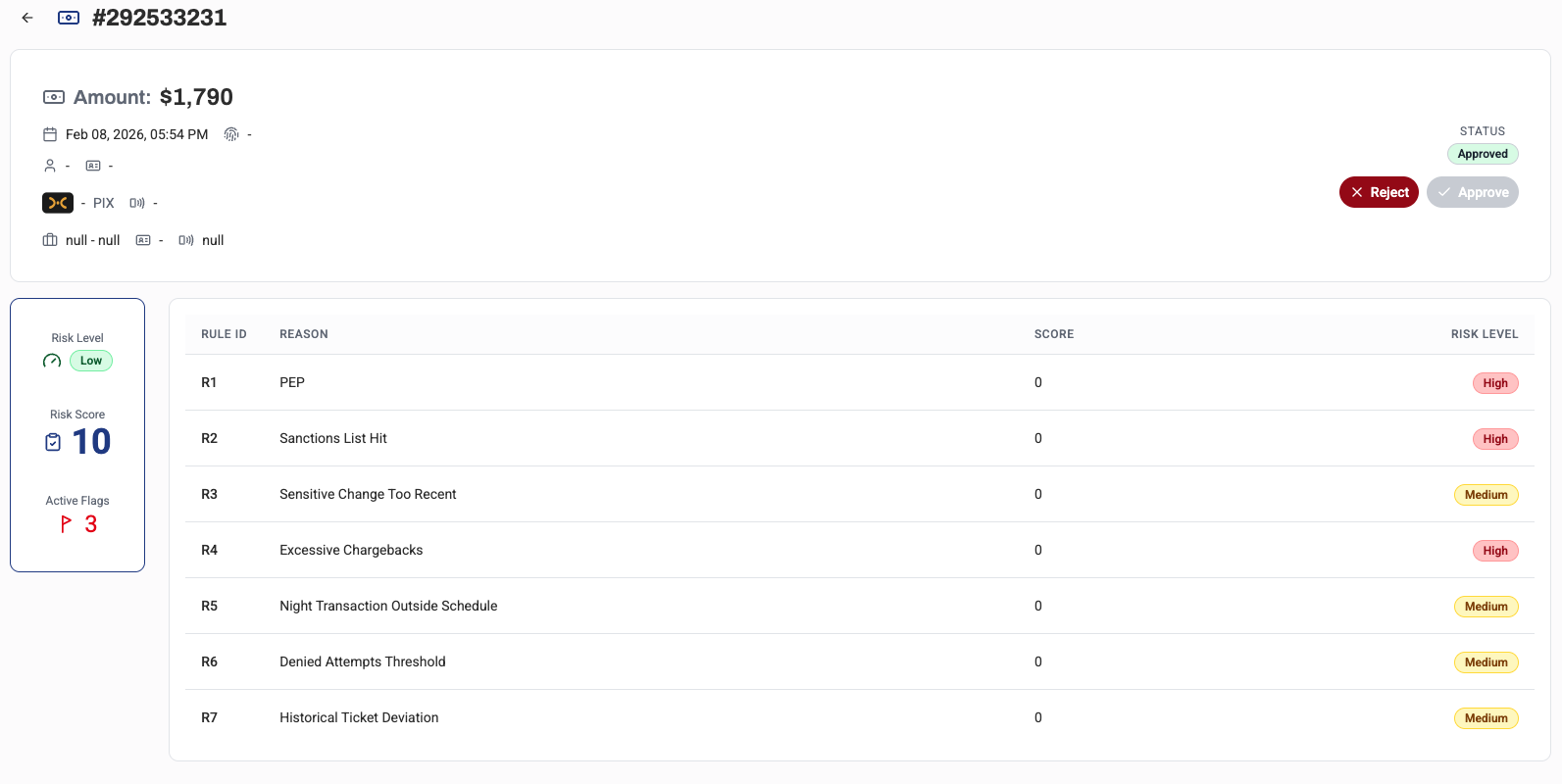
Transaction Information Tab
Core transaction data:
- Transaction ID
- Date and time
- Transaction type
- Amount and currency
- Exchange rate (if applicable)
- Fee information
- Payment method
- Reference/memo
Parties Tab
Information about transaction participants:
-
Sender/Originator
- Name and ID
- Account details
- Country
- Risk profile
-
Receiver/Beneficiary
- Name and ID
- Account details
- Country
- Risk profile
Risk Assessment Tab
Automated risk analysis:
- Overall risk score (0-100)
- Risk level classification
- Contributing risk factors
- Risk indicators triggered
- Historical risk comparison
Alerts Tab
Triggered alerts and rules:
- Alert type (AML, fraud, sanctions)
- Alert severity
- Rule/scenario that triggered
- Alert description
- False positive likelihood
- Resolution status
Screening Results Tab
Real-time screening outcomes:
-
Sanctions Screening
- OFAC, EU, UN sanctions lists
- Match confidence scores
- Matched entities
-
PEP Screening
- Politically exposed persons
- Relationship to PEPs
-
Adverse Media
- Negative news mentions
- Source and date
Pattern Analysis Tab
Behavioral patterns and anomalies:
- Transaction velocity (frequency)
- Amount patterns (unusual sizes)
- Geographic patterns (unusual countries)
- Time patterns (unusual hours)
- Historical comparison
- Peer group comparison
Investigation Tab
Case management for flagged transactions:
- Investigation status
- Assigned investigator
- Investigation notes
- Supporting evidence
- Related transactions
- Decision timeline
Activity Log Tab
Complete audit trail:
- All actions taken
- Status changes
- Screening results
- User actions
- System events
- Timestamps
Alert Management
Alert Types
Common alert categories:
| Alert Type | Description |
|---|---|
| High Value | Transaction exceeds threshold |
| Velocity | Too many transactions in short period |
| Structuring | Pattern suggests avoiding reporting requirements |
| Sanctions | Party matches sanctions list |
| High Risk Country | Involves sanctioned or high-risk jurisdiction |
| Round Amount | Suspiciously round number |
| Unusual Pattern | Deviates from customer's normal behavior |
| PEP | Involves politically exposed person |
Alert Actions
Investigators can:
- Review — Mark alert as under review
- False Positive — Dismiss as non-suspicious
- Escalate — Send to senior investigator
- File SAR/STR — Create suspicious activity report
- Block — Prevent transaction from completing
- Request Info — Ask customer for explanation
Alert Workflows
Automated workflows for alerts:
- Auto-dismiss low-confidence alerts
- Auto-escalate high-severity alerts
- Route alerts by type to specialists
- SLA tracking for alert resolution
Transaction Monitoring Rules
Rule Configuration
Create custom monitoring rules:
- Threshold Rules — Amount-based triggers
- Velocity Rules — Frequency-based triggers
- Pattern Rules — Behavioral anomalies
- List-Based Rules — Sanctions and watchlists
- Geographic Rules — Country-based risks
Rule Parameters
Configure rule settings:
- Threshold values
- Time windows
- Currencies
- Customer segments
- Risk weightings
- Alert severity
Testing Rules
Validate rules before deployment:
- Test with historical data
- Review false positive rates
- Adjust thresholds
- A/B testing
Risk Scoring
Scoring Methodology
Transaction risk scores consider:
- Transaction characteristics (amount, type, frequency)
- Customer risk profile
- Geographic risk
- Screening results
- Historical behavior
- Peer group comparison
Risk Factors
Individual risk factors include:
- Amount relative to customer profile
- High-risk country involvement
- First-time beneficiary
- Unusual time or day
- Round amount pattern
- Rapid movement of funds
- Cash-intensive business
Custom Scoring
Adjust scoring for your business:
- Weight risk factors
- Define risk thresholds
- Create custom factors
- Industry-specific models
Reporting and Analytics
Dashboard Metrics
Key performance indicators:
- Total transaction volume
- Total transaction value
- Alert rate
- False positive rate
- Average investigation time
- SAR/STR filing rate
- Top risk countries
- Top alert types
Reports
Generate compliance reports:
- Transaction summary reports
- Alert activity reports
- SAR/STR reports
- Regulatory reports
- Audit trail reports
- Custom reports
Export Data
Export transaction data for:
- Regulatory reporting
- Audit purposes
- Data analysis
- Integration with other systems
Supported formats:
- CSV
- Excel
- JSON
- XML (regulatory formats)
Investigation Tools
Related Transactions
View connected transactions:
- Same customer transactions
- Same beneficiary transactions
- Similar patterns
- Time-based clustering
- Network analysis
Network Visualization
Visual tools to identify:
- Transaction networks
- Fund flows
- Common parties
- Suspicious patterns
- Entity relationships
Timeline View
Chronological transaction view:
- Transaction sequences
- Pattern emergence
- Velocity visualization
- Investigation timeline
Regulatory Compliance
SAR/STR Filing
Suspicious Activity Report tools:
- Pre-filled SAR forms
- Supporting documentation
- Filing status tracking
- Regulatory submission
- Confirmation receipts
Audit Trail
Complete compliance documentation:
- All actions logged
- User attribution
- Timestamps
- Reasoning documented
- Defensible decisions
Best Practices
- Review Alerts Promptly — Don't let alerts age
- Document Thoroughly — Explain all decisions
- Tune Rules — Reduce false positives
- Look for Patterns — Single transactions may be part of larger scheme
- Use Network Analysis — Connect related transactions
- Stay Informed — Keep up with emerging typologies
- File SARs When Appropriate — Better safe than sorry
- Monitor Trends — Watch for changes in transaction patterns
- Collaborate — Share insights with team members
- Regular Training — Stay current on regulations and techniques